Please note that Taxnote data is not saved in iTunes or iCloud.
You can transfer data between iOS and Android devices only using Taxnote Cloud.
Contents
Cases that need manual backup
If you change the model of your device, you need to back up Taxnote data in advance as it is not be transferred automatically.
Warning
- Even if the data is temporarily migrated at the time of change, it may disappear at a later date, so be sure to back up from the settings.
- If you delete the app or lose your device without backing it up, you will not be able to restore your data.
- Migration and synchronization between Android and iOS devices are possible only via Taxnote Cloud.
Manual Data Backup & Restore for iOS
You can backup or restore your data with Dropbox, Evernote, Gmail, Google Drive or anywhere you can save your data with. You can restore data when you change your iPhone or iPad.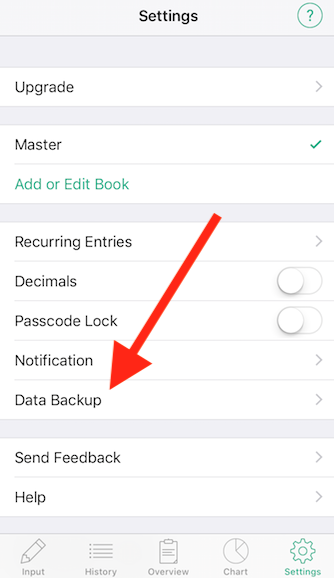
Watch the video below for manual backup and restore instructions.
* With Taxnote Cloud, your datais automatically backed up and can be synchronized between iOS version and Android version.
* Once logout from Taxnote Cloud and then restore the data, since you cannot restorethe manual backup data while logging in to Taxnote Cloud,
If you want to use Taxnote Cloud based on the manual backup data, delete the Taxnote Cloud account and create a Taxnote Cloud account again based on the restored data.