This page explains how to register daily transactions.
Contents
Enter data one by one
You can register daily transactions easily. The operating procedure is as follows.
- Tap the "Input" menu from the bottom of the screen.
- From the top of the "Enter" menu screen, tap [Expenditure] or [Income] according to the transaction you want to register.
- Select the date the transaction occurred from the Date area.
- Select the appropriate one from the Payment Method (for spending) or Receiving Method area.
- Select the appropriate account for the transaction you want to register from the Select Account area.
- Set the remarks as necessary.
- When no remarks are given:
Tap [Next] in the "Do not select remarks" area. - When giving remarks:
Tap the remarks to be added from the "Select Remarks" area, or add them from the [Add Remarks] button if they are not in the list.
- When no remarks are given:
- Enter the amount and tap the [Record in Journal] button.
Enter data continuously with the same date and subject
If you want to input transactions of the same subject on the same date consecutively, the "Pin: Continuous input" function is convenient. The operating procedure is as follows.
- Follow the step 1-6 of "Enter data one by one".
- Tap the [Pin] button at the top right of the screen. This allows you to enter continuously with the date and subject fixed.
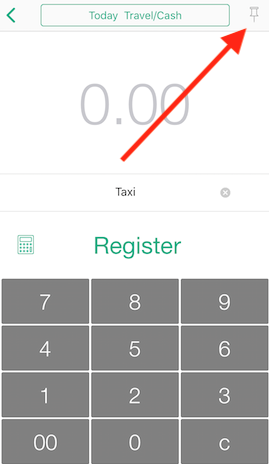
- Enter the amount for each transaction and tap the [Record in Journal] button to register.
Please refer to this explanation video for continuous input.